Using Your eWIC Card
Your eWIC card helps you buy healthy food—and keep track of your benefits
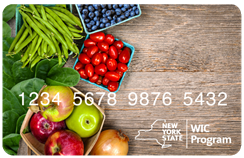
New York State WIC uses an eWIC card, which works like a debit card to buy WIC-approved foods and formula at stores and pharmacies.
You can:
- Swipe it at checkout for WIC-approved items
- Check your balance any time
- See what you can buy and manage your benefits through the ebtEDGE mobile app
What can I buy with my eWIC card?
WIC helps you buy:
- Fruits and vegetables
- Whole grains and cereals
- Milk, cheese, yogurt, and plant-based products
- Eggs, beans, nut/seed, butter, and canned fish
- Baby food and infant formula (if eligible)
- View the WIC Foods Guide and Infant Formula List
Where can I use my eWIC card?
You can shop at any store or pharmacy that accepts WIC.
- Find a WIC Store Near You
- Look for signs that say "WIC Accepted Here"
- Or use the ebtEDGE app to search for stores
How can I check my WIC balance?
There are six ways to check your eWIC card benefit amount:
- eWIC Cardholder Portal ebtEDGE
- New users can register here
- ebtEDGE mobile app (Apple) (Android)
- Your last store receipt
- The store's customer service desk
- Call eWIC Customer Service: 1-844-540-3013
- WIC2Go mobile app (current users only)
Need help with your card?
If you're having issues, try these options:
- Talk to your WIC office
- Call eWIC Customer Service: 1-844-540-3013
- Log into the eWIC Cardholder Portal ebtEDGE
- Report a card lost or stolen
- Select or change your PIN
- New: Freeze a misplaced card
- Review recent transactions
- Need more support? Check out the eWIC Card Guide (multi-language)
The ebtEDGE Mobile App can help you:
- Check your food benefits balance and expiration dates
- Scan items to see if they're WIC-approved
- Get reminders and notifications
- Find WIC stores
- Check transaction history
- Freeze/unfreeze your eWIC card if temporarily misplaced
- Report lost/stolen eWIC card
- Enter a transaction dispute
Download ebtEDGE on:
To create an account, you'll need:
- Your eWIC card number
- Your date of birth
- Your zip code and mailing address
Watch a quick video on how to get started with eWIC
